Technical SEO checklist: the four checks I run first
Technical SEO is the work of making sure search engines can reach, index and understand the pages of a site. This technical SEO checklist covers it in four checks, in the order they matter.
Most technical SEO checklists run to a hundred items. I have never found that useful. A hundred items with equal weight tells you nothing about where to start, and on a real site you rarely have time for more than five fixes this quarter.
I came to SEO from programming, so I think about a site the way I would think about any system: what has to be true before the next thing can work? For search, four things have to be true, in this order. A page has to be reachable, then kept, then understood, then trusted. If the first fails, the other three do not matter.
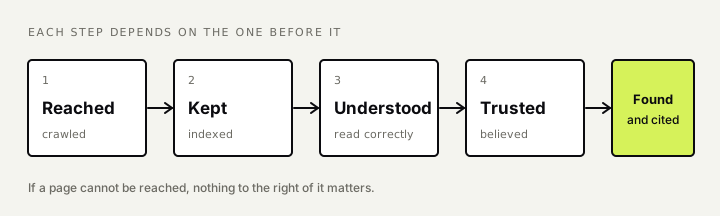
These are the four questions I ask of any site, and how I check each. I go into more depth on my technical SEO page.
1. Crawlability: can it be reached?
Search engines find pages by following links and reading sitemaps. A page nobody links to, or a page blocked from crawling, does not exist as far as search is concerned.
What I check:
- robots.txt. One wrong line here can hide a whole section. I read the file by hand. It is short enough that there is no excuse not to.
- Internal links. Every page that matters should be reachable in a few clicks from the home page, through ordinary links a crawler can follow. Links that only appear after a script runs or a button is pressed are a risk.
- Status codes. Pages that should work return 200. Pages that have moved return a 301 to the new address. Pages that are gone return 404 or 410, not a 200 with “not found” written on it.
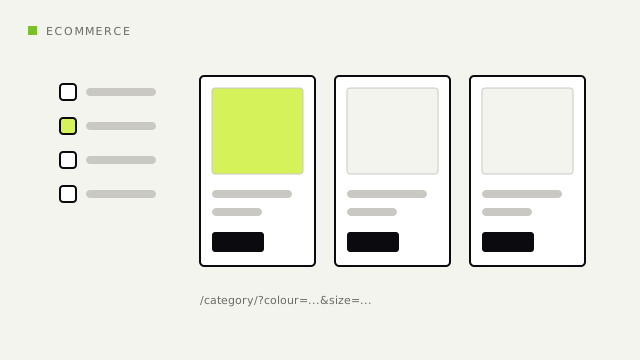
- Wasted crawling. On large sites, filters, sorting options and tracking parameters can create thousands of near-identical addresses. Crawlers spend their time there and reach the important pages late.
The quickest test is the crawl stats and page indexing reports in Google Search Console, then a crawl of your own with a tool such as Screaming Frog. Compare the pages the crawler found with the pages you want found. The gap between the two lists is your work.
[To add, Franklin: one or two sentences on a crawl problem you saw at DoctorOnCall, for example when the Q&A platform or forum was growing fast.]
2. Indexing: is it kept?
Being crawled is not the same as being indexed. A search engine decides whether each page is worth keeping, and it drops pages that look empty, duplicated or unwanted.
What I check:
- noindex tags left on by accident, often carried over from a staging site.
- Thin and duplicate pages. Tag pages with one post, empty category pages, the same product under five addresses. If a third of a site is pages like this, the good pages are judged in poor company.
What “Crawled, currently not indexed” means
This status in Search Console means Google fetched the page and chose not to keep it. A handful of these is normal. A large and growing number says the search engine has looked and was not persuaded.
The fix is rarely technical alone. It is usually a decision: improve the page, merge it into a better one, or remove it.
3. Canonicals, rendering and structured data: is it understood?
Once a page is kept, the search engine has to work out what it is and which version is the real one.
What I check:
- Canonical tags. Each page should name one address as the original, and every signal should agree with it: the canonical tag, the internal links, the sitemap and any redirects. When they disagree, the search engine picks for you.
- Rendering. If the main content only appears after JavaScript runs, I look at what the page contains before and after. Google renders JavaScript, though not always quickly. Many AI crawlers do not render it at all.
- Structured data. Schema markup states plainly what a page is: an article, a product, a person, a question with an answer. It should describe what is visibly on the page and nothing more.
- Headings and titles that say what the page is about in ordinary words. I cover this in my on-page SEO checklist.
4. Is it trusted?
This is the least technical of the four, and it still has technical parts: a secure connection, a site that loads at a reasonable speed on a phone, a clear author and a way to contact the business. None of these lifts a weak page. Their absence can hold back a good one.
The same four questions decide AI answers
I work on GEO, getting sites cited in AI answers, and I do not treat it as a separate job. I explain why in GEO vs SEO in 2026. An AI system that answers a question with sources has to fetch pages, decide which to use, read them and choose which to quote. That is reachable, kept, understood and trusted again.
Google’s John Mueller made the same point in a recent interview: AI systems build on search, so technical SEO stays relevant, and he described AI crawling as another flavour of the same work. The practical difference is that these crawlers are less forgiving. Content that needs JavaScript to appear, or that sits behind a login or a consent wall, is more likely to be missed.
The technical SEO checklist, in one place
Reached
- robots.txt does not block pages or files that matter.
- Every important page is linked from another page with an ordinary link.
- Working pages return 200, moved pages return 301, removed pages return 404 or 410.
- Filters and tracking parameters are not creating thousands of duplicate addresses.
- The XML sitemap lists only the pages you want indexed.
Kept
- No stray noindex tags.
- Thin, empty and duplicate pages are improved, merged or removed.
- “Crawled, currently not indexed” is small and not growing.
Understood
- Each page names one canonical address, and links, sitemap and redirects agree with it.
- The main content is in the page before JavaScript runs.
- Structured data matches what is visibly on the page.
- One clear title and one main heading per page.
Trusted
- The whole site loads over HTTPS.
- Pages load at a reasonable speed on a phone.
- Each article shows its author and date.
- There is a clear way to contact the business.
Where to start
If you only do one thing this week, run a crawl and put two lists side by side: the pages you want in search, and the pages Search Console says are indexed. Everything in the first list and not the second is a question one or question two problem. Fix those before you touch anything else.
[To add, Franklin: optional closing line in your voice, for example the first thing you look at when a new site lands on your desk.]
How I approach this: Technical SEO

I've worked in SEO since 2016, starting on the founding team of DoctorOnCall. I write here about SEO and how it carries over into AI search.