Ecommerce SEO best practices: categories, filters, products
Ecommerce SEO is the work of getting an online store’s category and product pages found in search. The best practices come down to three things, in this order: make category pages strong, keep filters from multiplying your pages, and make each product page answer the buyer’s question.
Most guides give a long list of tips with equal weight. On a store with thousands of pages that is not much help, because the same few problems cause most of the damage. These are the ones I look at first, on any platform: Shopify, WooCommerce or a custom build.
Category pages carry the weight
When people search for a kind of product, “running shoes” or “office chair”, Google mostly shows category pages, not single products. So the category page is usually the most valuable page type a store has, and often the most neglected.
A good category page has:
- A plain name that matches how people search. “Running shoes”, not “Performance collection”.
- A short introduction that helps someone choose, written for buyers. Two or three sentences is enough.
- Products that load in the page itself, not only after a script runs or a button is pressed.
- Links to its subcategories and to closely related categories.
- A stable address that does not change when stock changes.
Pagination needs no tricks. Let each page in the series be crawlable, with ordinary links between them, and let each one name itself as canonical.
Filters and the duplicate problem
Filters are useful to shoppers and dangerous to search. Every combination of colour, size, brand and sort order can create a new address showing nearly the same products. A category with ten filters can produce thousands of them. This is called faceted navigation, and it is the most common technical problem I see on stores.
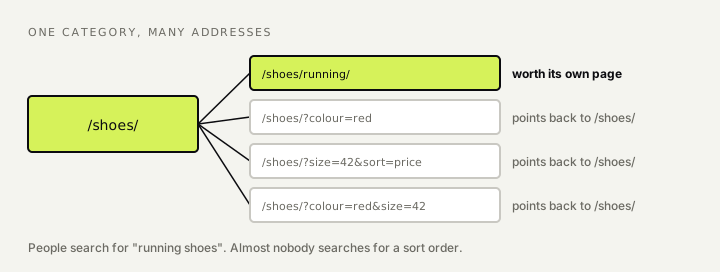
It causes two kinds of harm. Crawlers spend their time on near-copies and reach your real pages late. And the near-copies compete with the category page they came from.
The fix starts with a decision, not a setting. For each filter, ask: does anyone search for this?
- If yes, give it a proper page. “Running shoes” under “Shoes” is a real search, so it deserves its own address, title and introduction.
- If no, keep it out of the index. Sort orders, price sliders and most combinations of two or more filters belong here. Point their canonical tag back to the main category, and do not link to them from menus.
For very large stores, blocking pure sorting and tracking parameters in robots.txt saves crawling too. Be careful with that: a blocked page cannot pass on its canonical tag, so use it only for addresses you never want read at all.
[To add, Franklin: a sentence or two on how you handled filters or categories on the online pharmacy at DoctorOnCall.]
Product pages that answer the question
A product page has one job: tell a buyer what this is, whether it suits them, what it costs and whether they can have it.
- Write your own description. The manufacturer’s text is on every other store that sells the item. Even three original sentences on who it is for sets the page apart.
- Answer the practical questions on the page: size, materials, compatibility, delivery, returns.
- Show real reviews, and let them be read without a click.
- Use Product structured data with price, availability and review ratings, matching what is visible on the page.
- Describe your images and compress them.
When a product is out of stock
If it is coming back, keep the page live, mark it as out of stock in the page and in the structured data, and offer alternatives. If it is gone for good and there is a close replacement, redirect to it. If there is no replacement, let the page return “not found”. Do not redirect every dead product to the home page.
Variants
For colours and sizes of one product, choose one main address and have the variants point their canonical tag to it, unless people really search for a variant by name.
AI shopping answers
AI systems now answer “what is the best X for Y” by comparing products, and they lean on what they can read plainly: specifications, prices, availability and reviews. The same things that make a product page clear to a buyer make it usable to these systems. A current product feed and accurate structured data matter more than they did, because that is how prices and stock reach them.
The ecommerce SEO checklist
- Each category has a plain name, a short introduction and a stable address.
- Products appear in the page without needing a script or a click.
- Paginated pages are crawlable and each is its own canonical.
- Filters people search for have proper pages.
- Other filter and sort addresses point back to the category.
- Product descriptions are your own.
- Product structured data matches the page.
- Out-of-stock and discontinued products are handled on purpose.
- Variants share one main address.
- Your product feed is complete and current.
If you only have time for one, do number five. It is where most stores are losing the most.
[To add, Franklin: optional closing line on the first thing you check on a store.]
For the foundations under all of this, see my technical SEO checklist. For the pages themselves, see my on-page SEO checklist. My wider approach is on the ecommerce SEO page.
How I approach this: Ecommerce SEO

I've worked in SEO since 2016, starting on the founding team of DoctorOnCall. I write here about SEO and how it carries over into AI search.