Google November 2026 core update: what to do now
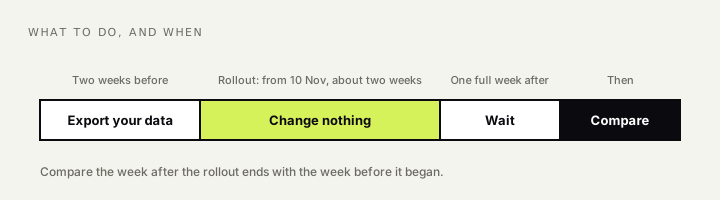
Google began rolling out its November 2026 core update on 10 November. It applies to all languages and regions, and Google expects it to take about two weeks. It is the third core update this year, after March and May. Google describes it as a regular update meant to better surface relevant, satisfying content from all types of sites.
That description is as much as Google ever says. So the useful question is not what the update contains. It is what to do while it is happening.
First, do nothing to the site
The worst response to a core update is a rushed change in the middle of it. Rankings move up and down while an update rolls out, sometimes more than once for the same page. If you rewrite titles or remove pages now, you will not know afterwards whether a change came from the update or from you.
Leave the site alone until the rollout is finished.
What to record now
Use the waiting time to collect a clean before-and-after picture.
- Note the dates. Rollout began on 10 November 2026. Write down the end date when Google confirms it.
- Export your Search Console data for the two weeks before 10 November: clicks, impressions and average position, by page and by search term.
- List your twenty most important pages and the searches they depend on.
- Write down anything else that changed in the same period: a redesign, a migration, a batch of new pages, a seasonal peak, a tracking change. Many “update losses” turn out to be one of these.
Google’s own advice is to wait at least a full week after the rollout ends, then compare that week with the week before it began. I would follow that. Comparing day by day during the rollout mostly measures noise.
How to tell if the core update affected your site
Once the dust settles, sort what happened into one of three cases.
Nothing much changed. This is the most common result, and it is fine.
A few pages or search terms moved. Look at what replaced you. If the pages now above you answer the question more directly, or are more recent, or come from a source with first-hand knowledge, that tells you what to improve. This is page-level work.
The whole site dropped, across most pages. This points to how Google judges the site overall, not to one page. Look for what is common across the site: a large share of thin or copied pages, content written for search engines more than for readers, or a subject where the site has no real standing.
Two things are worth remembering in the second and third cases. A core update is not a penalty, and there is nothing to “fix” in the sense of a broken setting. And recovery, when it comes, usually arrives with a later core update, not within days of your changes.
Rule out the technical causes first
Before deciding that an update judged your content, check that the drop is not something simpler. These come from my technical SEO checklist. I look at them in order:
- Did a noindex tag or a robots.txt line change?
- Did pages start returning errors, or redirect somewhere new?
- Did the site slow down or go offline for a period?
- Did the drop begin on 10 November, or did it begin earlier?
If the fall started a week before the update, the update did not cause it.
[To add, Franklin: a short example from your own experience would add a lot here, for instance a core update that hit or helped a site you worked on, and what you learned from it.]
What about AI answers?
Core updates change which pages Google ranks, and AI Overviews and AI Mode build their answers from pages Google can find and trusts. So a change in ranking can carry through to whether you are cited. In the same week as this update, Google also changed the default model behind AI Mode. Two changes at once make it harder to say which caused what, which is one more reason to wait before drawing conclusions.
If you track a fixed list of questions in AI systems, check it once now and once after the rollout ends. A full review is what an SEO audit is for.
Core update recovery: what to work on afterwards
If the update went against you, the honest work is the same as it has always been:
- Remove or merge pages that add nothing.
- Make each remaining page the clearest answer to one question.
- Add what only you can add: your own data, real examples, a named author who knows the subject.
- Fix the foundations, so that every page you care about can be crawled and indexed.
None of that is quick, and none of it is specific to November 2026. That is the point. Sites built this way tend to find core updates uneventful.

I've worked in SEO since 2016, starting on the founding team of DoctorOnCall. I write here about SEO and how it carries over into AI search.